Fixing a MacBook cracked case
Though generally pretty sturdy, Apple's MacBook line suffers from a slight design flaw that results in the front-facing edge of the case developing cracks and eventually losing small splinters of black or white plastic. This happens because of the pressure that users' wrists exert on the top of the case, below the keyboard. The outer edge of the top case plate, about 2mm, is much thinner than the surrounding material and is prone to cracking:
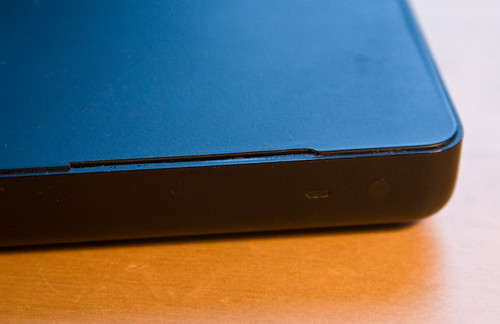
This is basically an æsthetic, rather than structural, problem. Nevertheless, there's an entire Flickr Group dedicated to the problem. The consensus seems to be that Apple will replace this part of the case if your laptop is under warranty (or AppleCare.) But for those of us whose computers are beyond the 1-year time limit, there's another option: replace the top case plate yourself.
The economics of this decision are pretty clear: used, but pristine case tops are available on eBay for about $70, whereas AppleCare warranty extensions are $350. You also have to consider the inconvenience of being without your laptop for days (weeks?) while it's being repaired, together with the possibility that your hard drive will be erased by a technician running the computer through a battery of tests.
Having decided to replace the part myself, I spent a good deal of time reading through the excellent disassembly guide at ifixit. The following pictures are from my own disassembly:
The basic strategy is to remove the over 1 dozen screws which bind the top of the lower-half case to the bathtub-shaped tray containing the motherboard, optical drive and other items. Some of these screws are accessible via the battery compartment, as shown above, whereas others are external on the right and left sides:
Once all the screws are removed, you can gently lift up the top of the case, which interestingly enough contains the entire keyboard assembly as an integrated part:
The thin silver band shown linking the case to the motherboard is the only cable which carries the trackpad and keyboard data to the motherboard. As you can see from the shot above, the MacBook unfortunately accumulates quite a bit of dust by virtue of its interior fans. My guess is that leaving the machine running on the floor for days at a time contributes significantly to this problem. I took the opportunity of having the entire case open to perform a bit of spring cleaning. Below is the motherboard looking a bit nicer:
After reassembling everything the front of the notebook was no longer marred by the chipped edge. We'll see how long this new case top lasts...
3 Comments
Leave a comment
0 TrackBacks
Listed below are links to blogs that reference this entry: Fixing a MacBook cracked case.
TrackBack URL for this entry: http://www.thegogglesdonothing.com/mt/mt-tb.cgi/539


Yes! the same thing is happening to my macbook! And you thought it was because I dropped it! no! Increasing splinters...
just had this done in the twilight of my AppleCare. They did it in store; it was ready 6 hours after dropoff.
Exactly what I'm looking for. I've got a jammed disk tray that I need to go in to examine and hopefuly repair. I didn't know quite where to begin until now.
I appreciate the high quality pics.
Roger